
op:tags
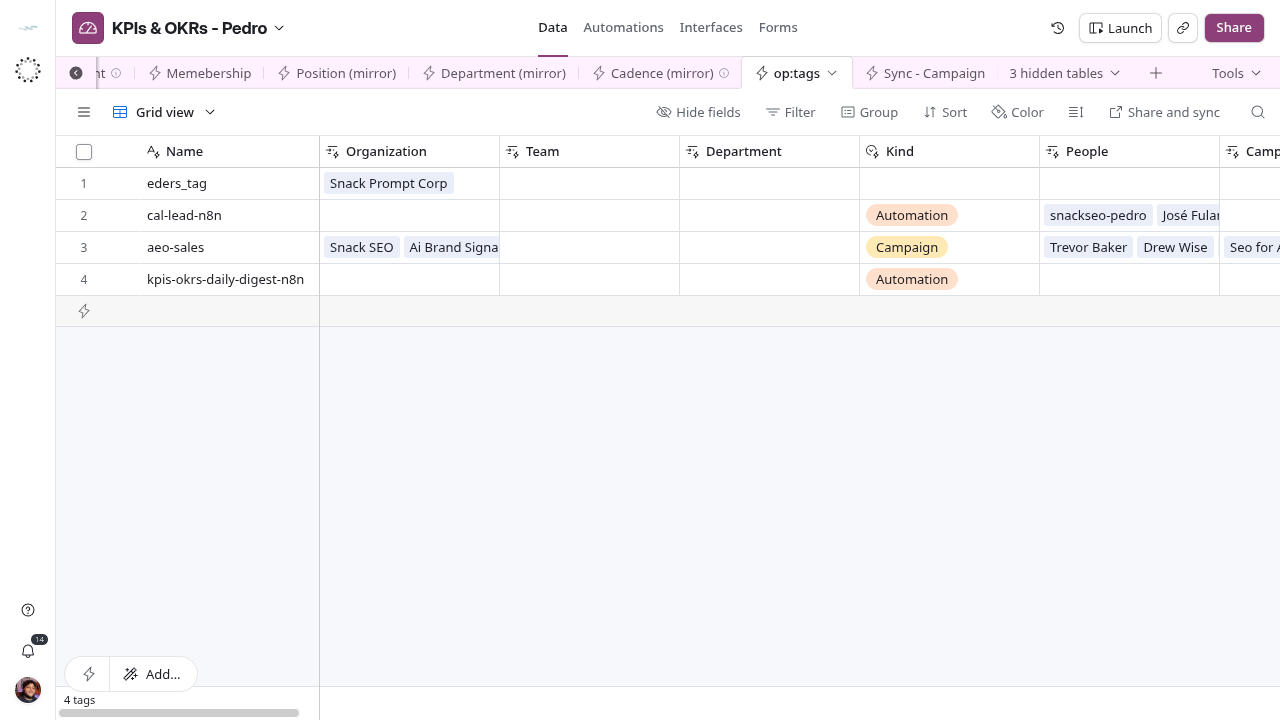
Local copy of the Core Tags catalog that every KPI table links to through its Tags column.
The shared definition and source fields are in Core / Tag. This page explains only how the catalog is used in KPIs & OKRs.
Use and boundaries
op:tags is a synced table: Core owns the labels, and this base receives them. Every native table and every mirror here, except Organization (mirror), has an optional Tags column that links to it. Organization (mirror) receives its labels through the synced tags column instead. The columns were added on 2026-10-22 when Tags was rolled out to all seven project bases.
Tags classify records. They do not grant access, create tasks, change status, enrol anyone in a campaign or select who Daily Digest asks. No KPI workflow reads them. Pick an existing label; to add, rename or retire one, change it in Core. On 2026-10-22 the catalog held three labels.
Columns in this base
Name, Kind and notes come from Core. The five source links without a reverse field (Organization, Team, Department, People, Campaign) also arrive from Core. Every other link is local: Airtable created it as the reverse side of a Tags column in this base.
| Field | Storage | Local usage |
|---|---|---|
| Name | Text | Synced from Core. The label people pick. |
| Organization | Linked records | Synced from Core · Organization (mirror) |
| Team | Linked records | Synced from Core · Memebership |
| Department | Linked records | Synced from Core · Department (mirror) |
| Kind | Single select | Synced from Core: Automation, Custom, Company, Team, Departament, Campaign. Departament is the source spelling. |
| People | Linked records | Synced from Core · Person (mirror) |
| Campaign | Linked records | Synced from Core · Sync - Campaign |
| notes | Rich text | Synced from Core. |
| Recurrence Configuration | Linked records | Reverse of Recurrence Configuration.Tags |
| Milestone | Linked records | Reverse of Milestone.Tags |
| Task | Linked records | Reverse of Task.Tags |
| Metric | Linked records | Reverse of Metric.Tags |
| Metric Target | Linked records | Reverse of Metric Target.Tags |
| Procedure | Linked records | Reverse of Procedure.Tags |
| Observation | Linked records | Reverse of Observation.Tags |
| Evaluation | Linked records | Reverse of Evaluation.Tags |
| Compliance Definition | Linked records | Reverse of Compliance Definition.Tags |
| Compliance Obligation | Linked records | Reverse of Compliance Obligation.Tags |
| Registration | Linked records | Reverse of Registration.Tags |
| Assignment Role | Linked records | Reverse of Assignment Role.Tags |
| Content | Linked records | Reverse of Content.Tags |
| Change Decision | Linked records | Reverse of Change Decision.Tags |
| Release | Linked records | Reverse of Release.Tags |
| Intake | Linked records | Reverse of Intake.Tags |
| Incident | Linked records | Reverse of Incident.Tags |
| Person (mirror) | Linked records | Reverse of Person (mirror).Tags |
| Membership (mirror) | Linked records | Reverse of Membership (mirror).Tags |
| Memebership | Linked records | Reverse of Memebership.Tags |
| Position (mirror) | Linked records | Reverse of Position (mirror).Tags |
| Department (mirror) | Linked records | Reverse of Department (mirror).Tags |
| Cadence (mirror) | Linked records | Reverse of Cadence (mirror).Tags |
| Tags | Linked records | Local self-classification of a label. It is not a parent hierarchy. |
| From field: Tags | Linked records | Reverse side of Tags in this table. |
Where to correct
Change label names, kinds and notes in Core Record Types[Tags]; the change reaches this base on the next sync. Add or remove a label on a KPI record here, in that record’s Tags column. The table name op:tags does not follow the (mirror) convention used by the other synced tables; it is still the synced Tags catalog. See Maintain shared records.