
Views and intakes
Every Data view and intake step in the base, plus the four native forms that are not used.
People work this base in the Data tab: grid intakes to create and complete records step by step, and saved views to review them. Airtable Interfaces and forms are not an operating path. All views below were listed on 2026-10-28: 67 views on 26 tables.
Operating surface
Open Data, pick the table, then the view. An intake section holds its steps in order; a record leaves a step when the step’s fields are complete, and Intake Check says what is missing. The CEO views are read-only review queues over the same records. Changing a view’s filters changes what everyone sees, so use a personal view for one-off searches.
View catalog
The views below were listed in current metadata. Groups without views are not implemented steps. The views on op:tags and Sync - Campaign are the default grids of synced tables.
Recurrence Configuration
- Step 1 - Define the collection request
- Step 2 - Choose the reporting owner
- Step 3 - Set cadence and target
- Step 4 - Validate and activate schedule
- Grid view
- CEO - KPI commitments — Active commitments by company and owner.
- CEO - No submissions yet — Active schedules with no linked observation.
Milestone
- Step 1 - Define the intended outcome
- Step 2 - Set owner and subject
- Step 3 - Set the execution dates
- Step 4 - Validate and activate objective
- Step 1 - Describe the proposed outcome
- Step 2 - Set proposal scope and date
- Step 1 - Accept or reject proposal
- bds:Milestone
- CEO - OKR progress — Milestones by business unit and status.
Task
- Step 1 - Describe and link the KPI
- Step 2 - Assign and report
- Step 3 - Set the deadline
- Step 4 - Check and activate
- bds:Task
Metric
- Step 1 - Define the metric
- Step 2 - Set rhythm and policy
- bds:Metric
- CEO - KPI catalog by company — Metric definitions by company.
Metric Target
- bds:MetricTarget
- Step 1 - Pick the metric
- Step 2 - Set subject and period
- Step 3 - Set the target value
- Step 4 - Check and attach work
Procedure
- Step 1 - Define the procedure
- Step 2 - Write the instructions
- Step 3 - Assign and activate
- Active library — Active procedures.
- Proposed review — Proposed procedures to decide.
- On hold — Paused procedures.
- Data quality — Intake Check findings or missing status.
- Archived reference — Archived procedures.
- Grid view
Observation
- Step 1 - Identify metric and period
- Step 2 - Enter result and evidence
- Step 3 - Review and record result
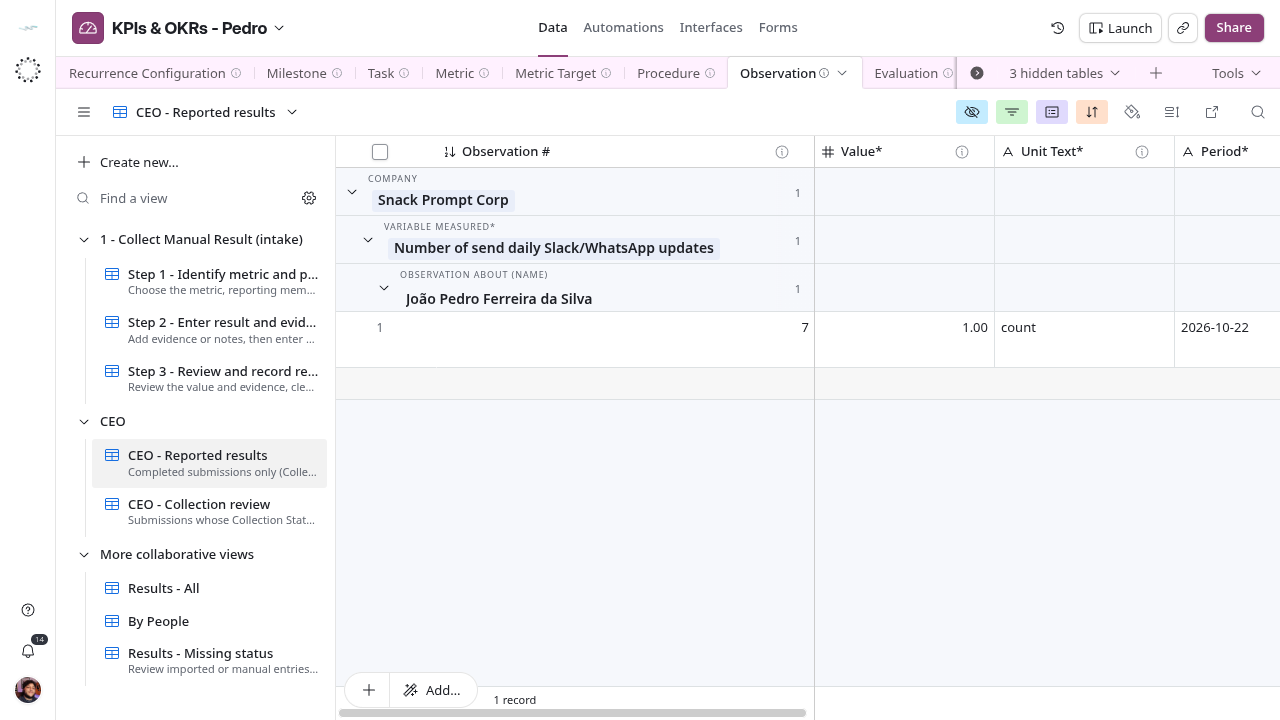
- CEO - Reported results — Recorded results by company, metric and person.
- CEO - Collection review — Results not marked Recorded.
- Results - All — Every observation.
- By People — Grouped by Observation About (Organization); no description.
- Results - Missing status — Imported or manual rows without Collection Status*.
Evaluation
Compliance Definition
Compliance Obligation
Registration
Assignment Role
Content
Change Decision
Release
Intake
Incident
Person (mirror)
Organization (mirror)
Membership (mirror)
Memebership
Position (mirror)
Department (mirror)
Cadence (mirror)
op:tags
Sync - Campaign
Form inventory
The base also has four native forms, listed below as they stood on 2026-10-21. They are not an operating path: people create and complete records in the intakes above, not in these forms. Confirm a form still exists before pointing anyone to it.
1 - Create a metric
Table: Metric. Action: create a record.
| Field | Required in this form |
|---|---|
| Name* | Yes |
| Unit Text* | Yes |
| Formula° | No |
| Direction* | Yes |
| Data Source° | No |
| Evaluation Policy* | Yes |
| Cadence* | Yes |
2 - Create a KPI target
Table: Metric Target. Action: create a record.
| Field | Required in this form |
|---|---|
| Target Value* | Yes |
| Period* | Yes |
| Baseline° | No |
| Start Date* | Yes |
| End Date° | No |
| Version* | Yes |
| Subject (Organization)° | No |
| Metric* | Yes |
| Subject (Membership)° | No |
| Subject (Team)° | No |
| Subject (Department)° | No |
| Recurrence Configurations° | No |
| Supersedes° | No |
3 - Create an objective (OKR)
Table: Milestone. Action: create a record.
| Field | Required in this form |
|---|---|
| Name* | Yes |
| Criteria* | Yes |
| Description* | Yes |
| Business Unit* | Yes |
| Start Date* | Yes |
| Target Date* | Yes |
| Accountable* | Yes |
| Evaluation Policy° | Yes |
4 - Submit a result and evidence
Table: Observation. Action: create a record.
| Field | Required in this form |
|---|---|
| Value* | Yes |
| Unit Text* | Yes |
| Period* | Yes |
| Observation Date* | Yes |
| Evidence° | No |
| Note° | No |
| Evidence Files° | No |
| Variable Measured* | Yes |
| Observation About (Membership)* | Yes |
| Recurrence Configuration° | No |
Form and intake differences
Create a metric does not expose Version*, although the intake requires a version: complete it in Data. The objective form requires Evaluation Policy° despite the optional marker in its name. Target subject fields are individually optional in the form; the intake requires exactly one category and linked work. The manual result form does not set Collection Status* or Submission Key. Review the resulting queues before treating registration as ready.