
Maintain shared records
Find or create the right Core record, promote proposed rows and verify the mirrors.
Outcome: a shared fact is correct in Core, there is one record for it, and the systems that mirror it show the change after their next sync. Reader: whoever maintains Core. You need edit access to Core Record Types; work through Data views, not Interfaces.
Choose the right record
Search before you create. Use People for identity, Organizations for the legal entity and Membership for the person’s participation in that organization. Positions survive a change of occupant; Team and Department are real units; Branch is a site of an organization, never a second organization. Address, City, State and Country describe places; create a City only when an address needs it. Cadence, Classification Term and Tags are catalogs: reuse an entry before adding one.
Decide where to edit
| Change | Edit in |
|---|---|
| Name, identity, contact or organization details | The Core record |
| Membership dates, position or team | Core Membership, Positions, Team or Department |
| A place | Core Address, then City, State or Country if missing |
| Campaign definition, owner, dates or lifecycle | Core Campaign intake views |
| Cadence definition | Core Cadence; review every consumer before changing Key |
| Task executor, target subject or observation owner | The KPIs & OKRs record and its local link |
| Sales relationship, interaction, deal or campaign enrollment | The CRM record |
| Slack account or workspace selection | Tooling and Access identity configuration |
| A stale value in a mirror | Core first; then investigate the sync. Never edit the copy |
Promote a proposed person or organization
Rows created by the CRM two-way mirrors or by the Cal.com booking workflow should arrive as Proposed. Review them regularly.
- Open People › by Tag and find the group for the tag that marks the source, such as cal-lead-n8n. Rows with no Status also need review.
- Search People by Email* (for an Organization, search Website°) for an existing record of the same person or company.
- If a duplicate exists, keep the older record, move the links you need to it and set the newer one to Superseded. There is no merge link yet, so note the surviving record in Notes.
- If it is new, complete what Health check lists as missing and set Status to Active.
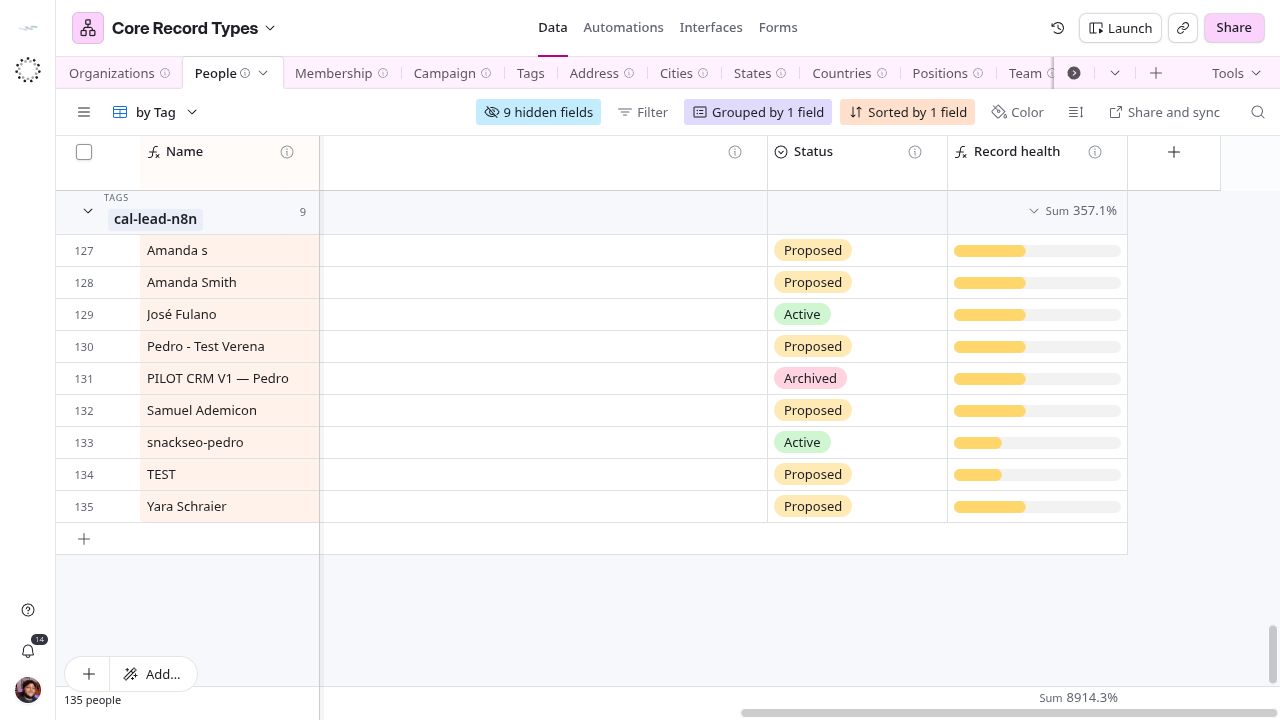
Success: one Active record per person or company, Health check close to ✅, and the CRM row still linked to it after the next sync.
Add a place
- Search Address for the street line. Reuse it if another person or company already uses it.
- Otherwise create the Address, fill Street Address* and Type, and link City, State and Country.
- If the city is missing, add it in Cities with Name and State, and check Active. States already holds the United States and Brazilian divisions; cities are added one at a time, never imported in bulk.
- Link the address from the Person (Address), the Organization (Primary Address or Registered Agent Address) or the Branch (Address).
Type Zipcode carefully: it is a number and drops a leading zero.
Verify the mirror
After a correction, check the source value, then the matching mirror, then the lookup that consumes it. A table name containing “mirror” and matching labels do not prove the sync configuration; check the sync settings in the consuming base: source base and view, included fields, filters and last refresh. Airtable record IDs are local: never paste a Core record ID into a consumer’s link field. If the mirror has not refreshed, record the source and the time you checked instead of creating another identity.
Known naming differences
| Core source | Consumer | Consequence |
|---|---|---|
| People: First Name*, Last Name* | KPIs & OKRs Person (mirror): Given Name, Family Name | Verify the column mapping; do not rename by assumption |
| Membership: Membership ID, Membership (Name) | KPIs & OKRs Membership (mirror): Membership #, Membership ID | Verify the key workflows consume; the Daily Digest reads the name from Membership # |
| Organizations: Status, Legal Name* | KPIs & OKRs Organization (mirror): Lifecycle Status, Legal Name | Source and projection names differ |
| Team | KPIs & OKRs Memebership, CRM Positions, Tooling and Access Grid view | These consumer tables model teams |
| Source formulas and record links | Copied text or numeric values | Consumer storage type does not prove local calculation or relationship |
Check downstream effects
A name change can affect the Daily Digest’s name-based recipient match. A Cadence Key change can alter due-item matching and period keys. A Membership status change can remove a person from an accountable picker in CRM or KPIs & OKRs. Keep test-recipient restrictions when testing notifications.