
Keep work items current
Find open work, add new items and close them, so the backlog always says where things stand.
Outcome: anyone, a person or an agent, can open Work Item and see what is open, what is waiting and on what, without looking anywhere else.
Reader: everyone who changes the systems, including AI agents that work on them.
Find open work
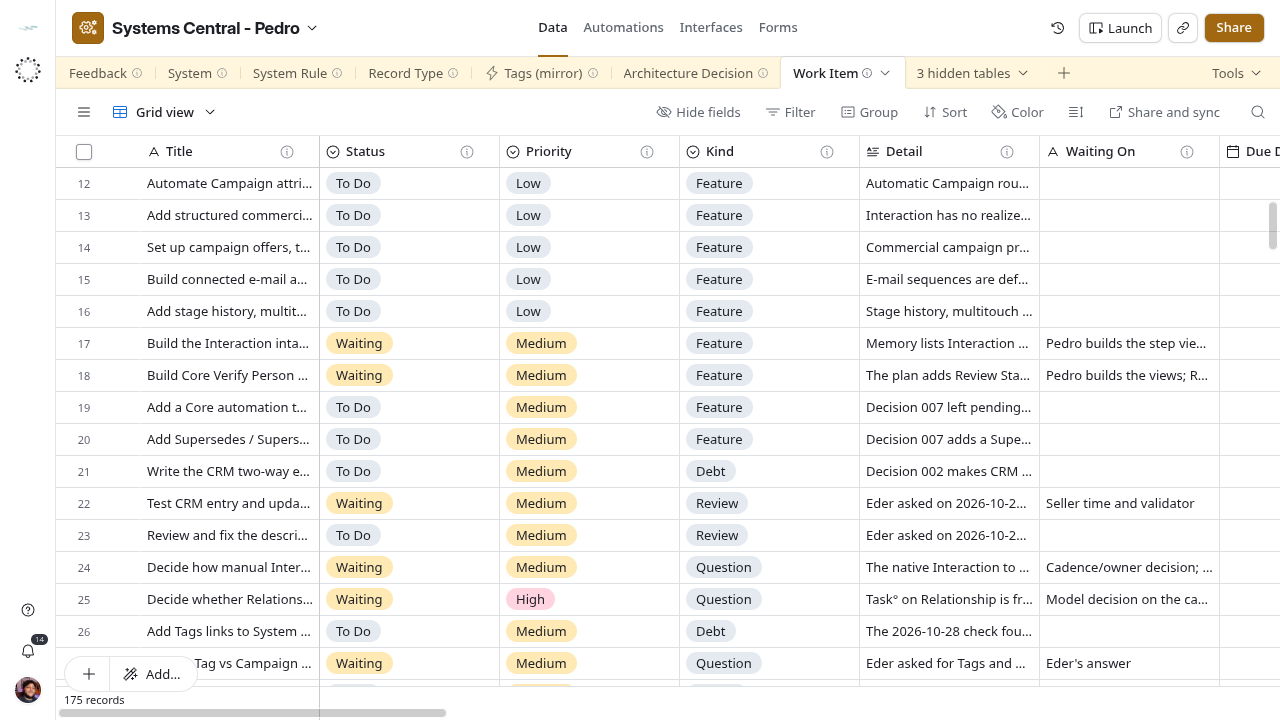
- Open Data → Work Item → Grid view.
- Filter Status is not
Doneand notCancelled. Group by Status or Systems if you need a queue. The base has no saved queue view yet. - Read Title, then Detail for what done looks like, and Source for where it came from.
- For a Waiting item, Waiting On names the person, answer or event, and Blocked By names any item that must finish first.
Add an item
Add a row whenever work is left open: a fix found during a session, a question nobody answered, a review someone owes or an approval pending. Write it here: this table is the only backlog.
- Title: start with a verb (
Add a technician check to Service Visit). - Kind: Debt, Feature, Review, Question or Approval: what closing it takes.
- Detail: two to four sentences: what is wrong or missing, then how we will know it is done.
- Status:
To Do, orWaitingwith Waiting On filled. Use Blocked By when the wait is another Work Item. - Priority:
Highonly when it blocks other work or breaks something in use. - Source and Recorded On: the path or link of the document where it was written, and that date.
- Link Systems, and Record Types, System Rules or Architecture Decisions when they apply. Link Assignee only when a person has taken it.
- Due Date only for a real, agreed deadline.
- Leave Checked unticked. A person ticks it after confirming the item is real and well described.
Search first: an existing item with the same outcome gets a new Source line instead of a second row.
Move and close an item
| When | Set |
|---|---|
| Someone starts | Status In Progress; Assignee if a person |
| It cannot move | Status Waiting; Waiting On or Blocked By |
| The wait clears | Clear Waiting On; back to To Do or In Progress |
| Detail’s definition of done holds | Status Done; Done On today |
| It will not be done | Status Cancelled; Done On today; the reason in Detail |
Never delete a finished item. Done and Cancelled rows are the record of what happened.
In every session
- At the start, read the open items for the systems you will touch: filter Systems, or search by keyword.
- During the session, move items you work on to In Progress.
- At the end, close what is finished (Done, Done On), add a row for each new open point, and update Waiting On where the wait changed.
- Do not tick Checked on items you created yourself as an agent; that is a person’s review.
No automation does any of this. The table is only as current as the last session left it.