
Register a record type
Record which system keeps a new kind of record and which systems mirror it.
Outcome: the new kind of record has one Record Type row with its owner, table id, type and mirrors, so every reader knows where to correct it.
Reader: whoever creates a table, adds a mirror or moves a table between bases.
Before you start: the table exists in its System of Record and has a table description with its vocabulary type. The System row exists.
Steps
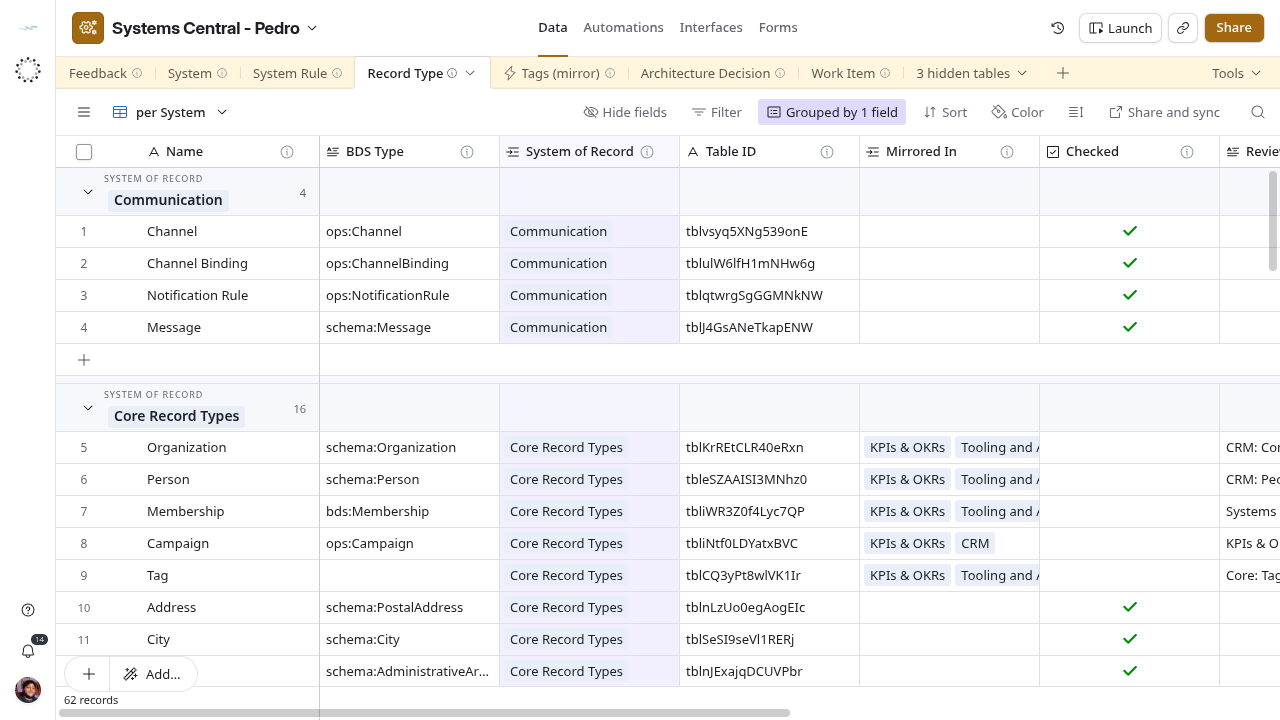
- Open Data → Record Type → per System. Search by name and by type. If the kind already exists under another name, do not add a row; a mirror is never a second record type.
- Add a row. Name is the singular name the group uses (
Service Visit), not the table name if that differs. - BDS Type: copy the type from the source table’s description, one value, short form (
ops:ServiceVisit). - System of Record: link exactly one system, the one where people create and correct these records.
- Table ID: paste the
tbl…id of the original table. - Mirrored In: link every system that has a synced copy, whatever that copy is called. Leave blank when nothing syncs it.
- Leave Checked unticked. Write in Review Note anything still unconfirmed, one line per base and table.
- When someone has confirmed the type, the owner and every mirror, tick Checked and clear Review Note.
When a mirror is added or removed
Open the existing Record Type row and add or remove the system in Mirrored In. If the new copy has a misleading name or no description, note it in Review Note and untick Checked. The row then shows in Need Attention.
When ownership moves
Relink System of Record and replace Table ID only after the architecture decision that moves it is Accepted. Link that decision through the decision’s Record Types column once Architecture Decision has rows. Until then, cite it in Review Note.
Success
The row appears under the right group in per System. The System row lists it in Record Types (Original) and each mirror system lists it in Record Types (Mirrored).