
Rules and checks
The catalog rules recorded in Systems Central and how far each check column enforces them.
Systems Central records six System Rules for Products & Services. Offer Check, List Check and Component Check check part of them. Product Check, Brand Check and Category Check also check the required identity fields before activation. A check shows one ⚠ fragment per problem it finds; blank means nothing it looks for is wrong.
Rules and their checks
| System Rule | Enforced by | What the check catches | What it misses |
|---|---|---|---|
| Goods and services are one Product table | Manual review | Not applicable; Kind is derived from Product Type* | Stock, purchase cost or recipe columns added to Product |
| An offer sells one product through one seller | Offer Check and manual review | A blank Product*, a blank Seller* | Two products or two sellers linked to one offer |
| A price list has one seller and one currency | List Check | Offers from more than one seller, offers in more than one currency, a list with no offers | A single offer whose currency differs from the intended list currency when it is the only offer |
| A product never includes itself | Component Check | A line whose whole and part are the same single product | Partial overlaps when several products are linked; indirect loops (A includes B, B includes A) |
| A deal proposes exactly one offer | CRM Deal formulas and manual review | Checked in the CRM | Not checked in this base |
| Core and Products & Services never name their readers | Manual review | Not applicable | A column, view or link named after a reading domain |
The “deal proposes exactly one offer” rule lives on the CRM Deal; see Deal. The first rule’s source document, the build rules, is still marked as a proposal awaiting approval.
Read a check
| Fragment | Column | Fix |
|---|---|---|
| ⚠ No product name. / ⚠ No product type. | Product Check | Fill Name* and select Product Type* |
| ⚠ No brand name. | Brand Check | Fill Name* |
| ⚠ No category name. | Category Check | Fill Name* |
| ⚠ No product. | Offer Check | Link Product* |
| ⚠ No price. | Offer Check | Enter Price* |
| ⚠ No currency. | Offer Check | Select Price Currency* |
| ⚠ No unit. | Offer Check | Select Unit* |
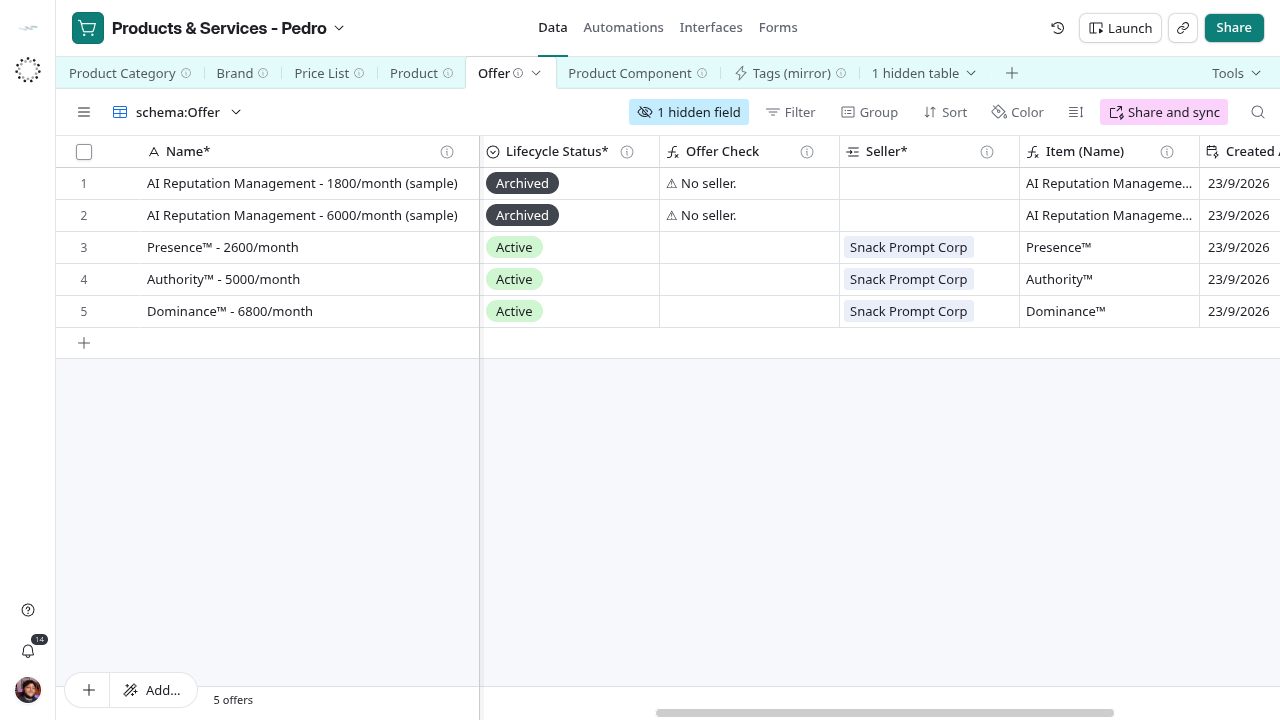
| ⚠ No seller. | Offer Check | Link Seller* |
| ⚠ Valid From is after Valid Through. | Offer Check | Correct the dates |
| ⚠ Offers from more than one seller. | List Check | Fix Seller* on the offer that differs, or move it to another list |
| ⚠ Offers in more than one currency. | List Check | Fix Price Currency* on the offer that differs, or move it |
| ⚠ No offers on the list. | List Check | Link Price List° from an offer |
| ⚠ No product. / ⚠ Nothing included. | Component Check | Link Product* or Includes* |
| ⚠ A product cannot include itself. | Component Check | Link a different part |
| ⚠ No quantity. / ⚠ No unit. | Component Check | Enter Quantity* or select Unit* |
Reference grid captured on 2026-10-28, before the intake views and label updates. Use the current view names in this guide.
Limits of the checks
Checks run on every row, including Draft and Archived ones: the two archived sample offers show ⚠ No seller. The field descriptions ask for a blank check only on Active rows. No check blocks saving, changes Lifecycle Status* or notifies anyone. List Check reads the two rollups Seller (from Offers) and Currency (from Offers) and looks for the “ | “ separator; confirm the rollup aggregation formula in the field settings.