
Onboard a seller
Connect a Cal.com account to one accountable company and membership.
A maintainer configures routing; the seller supplies the calendar access and confirms availability. You need an active Core membership in the selling company and a Cal.com account represented in Tooling and Access.
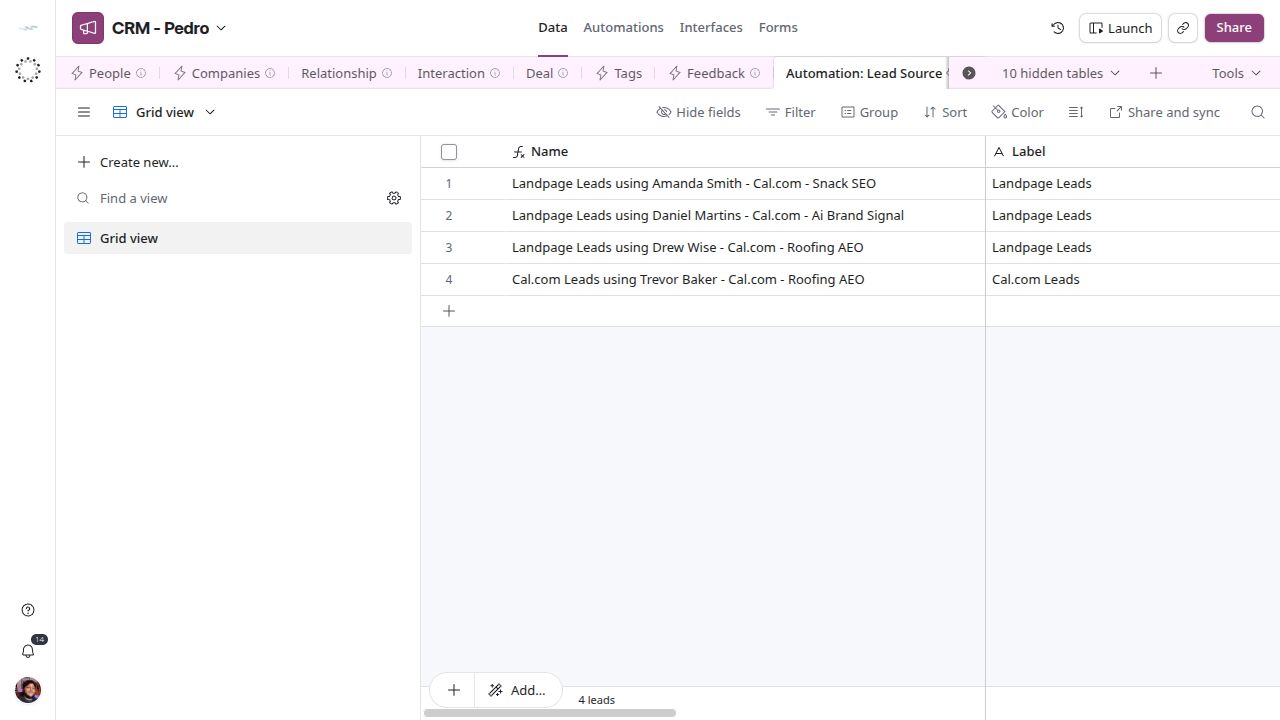
Lead Source routes external accounts to the accountable seller.
Flow
The maintainer sets up one routing rule per Cal.com account and proves it with a test booking before the seller goes live.
Mermaid source
flowchart TD
  mem["Check the Membership<br/><small>Core: company and user binding</small>"]:::action
  acc["Maintain the Cal.com Tool Account<br/><small>Tooling and Access: External Identifier, Login Alias</small>"]:::action
  rule["Fill the routing rule<br/><small>Automation: Lead Source</small>"]:::action
  pair{{"Tool, Tool Identifier/Login<br/>and target pair correct?"}}:::decision
  act["Enable Active<br/><small>one matching rule</small>"]:::action
  test["Authorized test booking<br/><small>then reschedule and cancel</small>"]:::action
  wf[["Cal.com Booking Intake<br/><small>n8n: Deal and Interaction</small>"]]:::automation
  ok{{"Interaction linked to a Deal at<br/>Meeting Scheduled, right pair?"}}:::decision
  fix["Fix the rule, repair<br/>Deal and Interaction ownership"]:::action
  done(["Seller routed"]):::outcome
  mem --> acc --> rule --> pair
  pair -- no --> rule
  pair -- yes --> act --> test --> wf --> ok
  ok -- yes --> done
  ok -- no --> fix --> test
Prepare identity and account
Verify the seller’s Membership, company and user binding in Core. A person can have memberships in several companies; choose the one that owns these leads. In Tooling and Access, maintain the Cal.com Tool Account, its External Identifier and Login Alias. Verify the mirrored values in CRM without opening or copying Access Token.
Configure the routing rule
In Automation: Lead Source, link External Tool Account, Follow up Target: Company and Follow up Target: Person. Verify Tool resolves to Cal.com and Tool Identifier/Login match the organizer or destination-calendar keys sent by that account. Enable Active only after the pair is correct. Keep one matching active rule; the current workflow uses the first match and has no ambiguity error.
Connect and verify
Use the existing Cal.com webhook integration and its secret in the approved credential location. The endpoint and secret are intentionally absent from public documentation. The workflow has no cron: it receives booking events. With an authorized test booking, verify one Interaction with Booking UID, People° and the correct accountable pair, linked in Deal° to a Deal at Meeting Scheduled with the same pair, and a matching next date/action on the Interaction. Compare displayed timezone with the organizer timezone. Test rescheduling and cancellation separately; do not send a booking to an unrelated person just to validate the docs.
Recover incomplete routing
No active rule leaves a warning and an unassigned record. Correct the rule, then repair existing Deal and Interaction ownership explicitly; a duplicate delivery may stop at Booking UID rather than repair it. If the person has not synced, resolve the Core record and link it later. Follow Cal.com Booking Intake for partial-failure recovery.