
Feedback
Report a problem, question or improvement in the CRM.
One Feedback record is a report about the system, not a sales contact. Describe the page, action, expected result and observed result. Attach only relevant evidence.
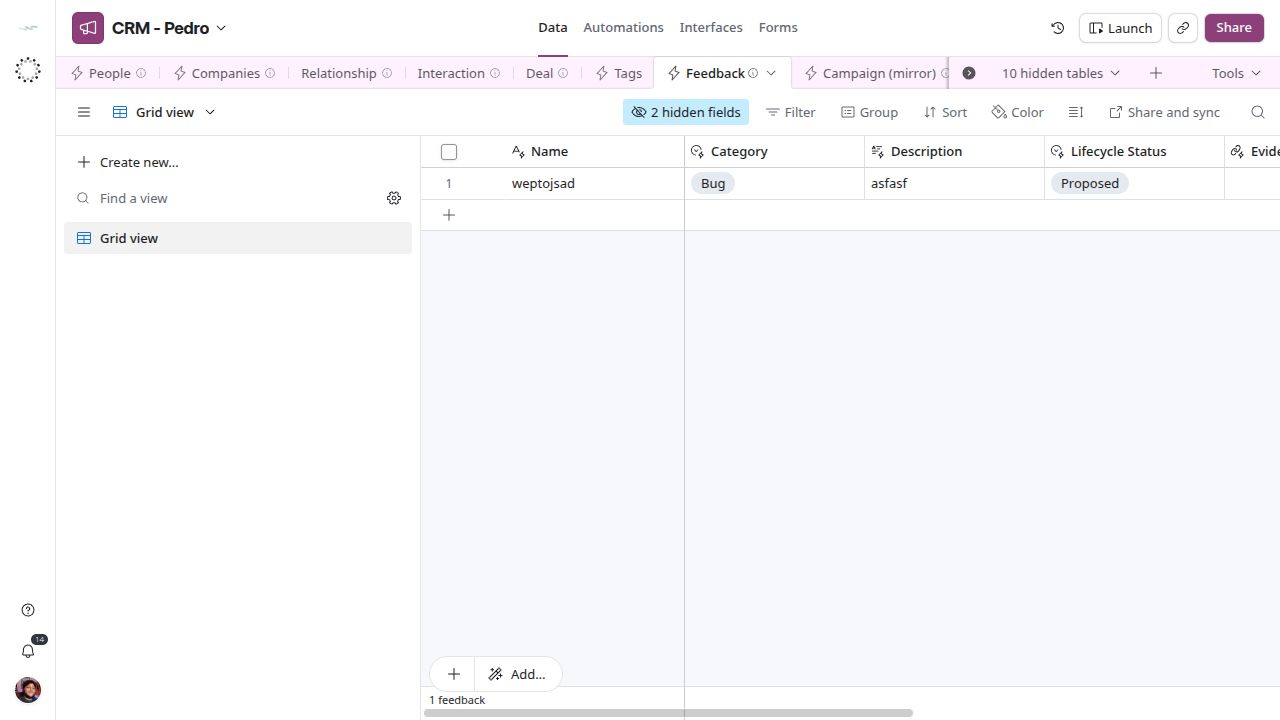
Feedback reports are created and reviewed in the main view.
Rules and relationships
Create and review reports in Data → Feedback → main. Fill Name, Category and Description, identifying the table/view and steps to reproduce the issue. Use Evidence File or Evidence (File Link) for supporting evidence. Lifecycle Status tracks handling; saving a report sends no notification and starts no service-level timer. System Key and Submitted By provide context when populated. Interface is a retained legacy field; the operating path uses Data views.
Fields
| Field | Storage | Current configuration |
|---|---|---|
| Name | Text | Stored value or system-managed audit; edit according to the workflow. |
| Category | Single choice | Bug, Improvement, Suggestion, Question |
| Description | Long text | Stored value or system-managed audit; edit according to the workflow. |
| Lifecycle Status | Single choice | Draft, Proposed, Active, On Hold, Completed, Cancelled, Archived |
| Evidence (File Link) | URL | Stored value or system-managed audit; edit according to the workflow. |
| Evidence File | Attachments | Stored value or system-managed audit; edit according to the workflow. |
| Submitted By | User account | Stored value or system-managed audit; edit according to the workflow. |
| System Key | Single choice | Operations, Core Record Types, Tooling and Access, Fintable, Snack Access, Snack Sync, Snack Connect, Systems Central, Communication, CRM, Products & Services |
| Interface | Text | Stored value or system-managed audit; edit according to the workflow. |
| Tags | Linked records | Tags; Multiple-record picker |
| Created At | Creation time | Read only; sorts the feedback intake newest first |
| Intake Step | Formula | Calculated; see rules below. |
| Resolution Plan | Long text | Stored value; edit according to the workflow. Added on 2026-11-04, no field description yet |
| Resolved Date | Date | ISO format (YYYY-MM-DD). Added on 2026-11-04, no field description yet |
| Response | Long text | Stored value; edit according to the workflow. Added on 2026-11-04, no field description yet |
Tags was added on 2026-10-22 by the Universal Tags rollout. It is an optional local classification from the shared catalog; it does not grant access, create tasks, change status or enroll a campaign. Tag names are managed in Core.
Calculated rules
While Lifecycle Status is Draft or blank, Intake Step routes the report: Feedback - 1 needs Name, Category and Description; Feedback - 2 is ready for context, evidence and submission as Proposed. It is blank after submission.
Intake Step
IF(OR({Lifecycle Status}=BLANK(),{Lifecycle Status}="Draft"),IF(OR({Name}=BLANK(),{Category}=BLANK(),{Description}=BLANK()),"Feedback - 1","Feedback - 2"),BLANK())